

The DTF Gangsheet Builder is transforming the landscape of custom printing, making it a must-have tool for any printing enthusiast. By facilitating Direct to Film (DTF) printing, this innovative builder allows for the creation of vibrant and intricate custom designs in a single step. This guide will delve into the nuances of the DTF printing process, offering a comprehensive DTF printing tutorial that covers tips, tricks, and industry insights. Whether you’re a seasoned professional or just starting out, mastering the DTF Gangsheet Builder will streamline your workflow and enhance your creative printing methods. Join us as we explore how to maximize efficiency and creativity using this groundbreaking technology in the realm of printing.
Introducing the DTF Gangsheet Builder, an essential tool for those engaged in film-to-fabric transfer techniques. This sophisticated system supports a modern approach to custom printing that merges creativity with efficiency, making it easier for users to harness advanced printing methods. With the rise of DTF film techniques, aficionados and professionals alike can appreciate the seamless integration of multiple designs on a single film sheet, truly optimizing production workflows. The step-by-step process outlined in this guide will demystify the DTF printing process, from creating designs to successful transfers on various materials. Embrace the future of printing and elevate your custom art with the innovative possibilities offered by this tool.
Understanding the DTF Printing Process
DTF printing, or Direct to Film printing, has revolutionized the world of custom printing techniques by allowing complex designs to be printed onto a transfer film that can be applied to various substrates. The DTF printing process involves several steps, beginning with the creation of high-quality artwork. This ensures that the print will be vivid and durable, as the inks used in the process are specially formulated to adhere to a wide range of fabrics. Once the designs are printed onto the film, a powder adhesive is applied to ensure proper bond during the heat transfer stage.
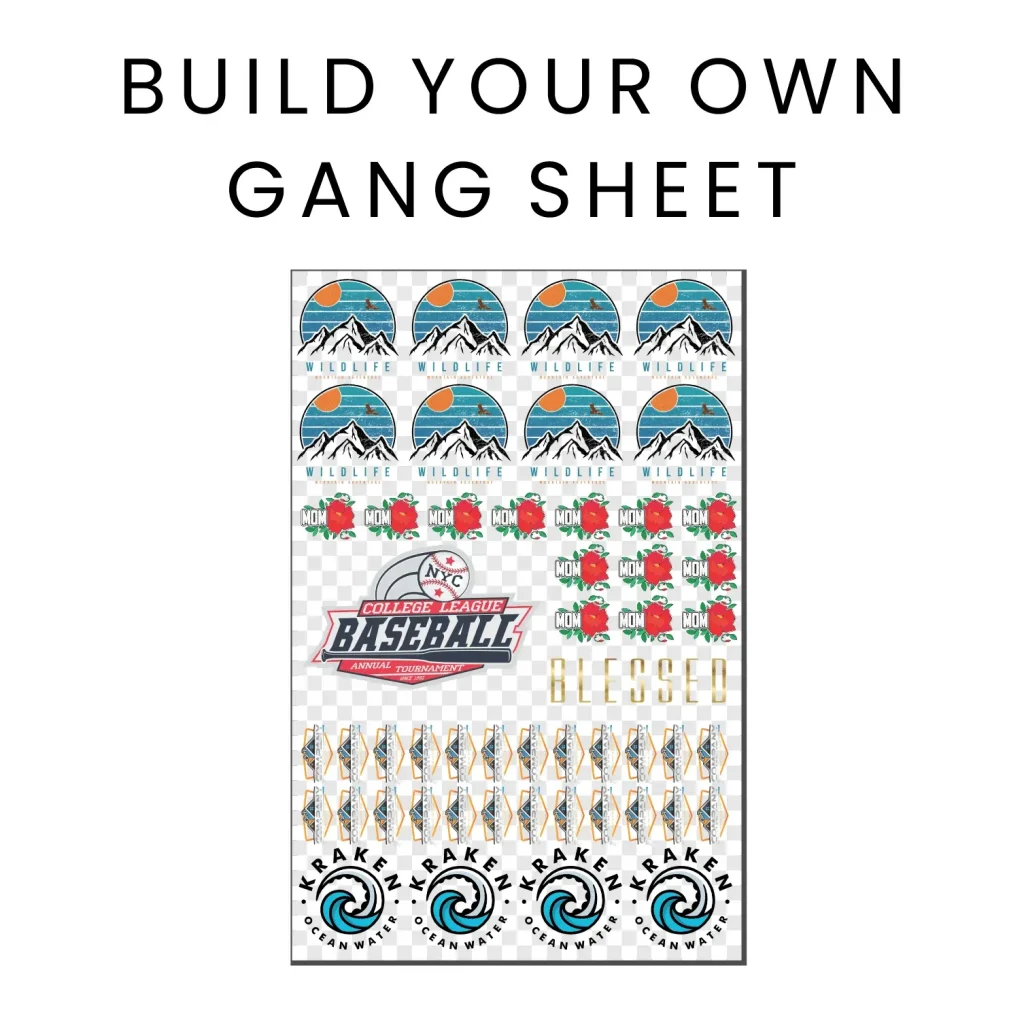
One of the primary advantages of DTF printing is its flexibility. This creative printing method allows users to transfer multiple designs onto a single gangsheet, maximizing material use and minimizing waste. Additionally, DTF printing is compatible with both light and dark fabrics, offering a versatile solution for custom apparel and merchandise. The recent advancements in DTF technology have further enhanced the quality of prints, making them more vibrant and long-lasting.
Maximizing Efficiency with the DTF Gangsheet Builder
The DTF Gangsheet Builder is a crucial tool that simplifies the workflow of DTF printing. By maximizing sheet usage, it enables printers to layout multiple designs effectively, thereby optimizing the printing process. This not only saves valuable resources but also contributes to faster production times. The intuitive interface allows for easy arrangement and alignment of designs, and with the option to preview layouts, users can ensure that every inch of the film is utilized efficiently.
Moreover, the DTF Gangsheet Builder provides the capability to adjust spacing and alignment before printing. This ensures high-quality outputs without the risk of overlapping images, which could lead to wasted film. As more users adopt this tool, it becomes increasingly essential to understand the various features it offers. Mastering the Gangsheet Builder can greatly enhance your printing operations, elevating your custom printing capabilities.
Tips for Successful Design Creation in DTF Printing
Successful DTF printing starts with the design phase. Creating or selecting a design that translates well onto various materials is key. Designers should utilize graphic design software like Adobe Illustrator to meticulously prepare artwork, ensuring that images are not only visually appealing but also optimized for print. Proper sizing and a resolution of at least 300 DPI will make a significant difference in the final output, ensuring crisp and clear images.
Additionally, understanding the nuances of color in DTF printing is important as well. DTF printers rely on color profiles that must be accurately set to achieve the intended color match on the final product. This attention to detail during the design creation process can save significant time and resources later in production, preventing issues such as inaccurate hues or pixelation.
Adjusting Print Settings for Optimal Results
Adjusting print settings is a quintessential step in achieving optimal results with DTF printing. One of the most crucial aspects is selecting the correct color profiles and media settings to match the specific requirements of DTF films. This ensures that the printer produces images with accurate colors and the right texture, ultimately resulting in a quality print that adheres well to fabric. Users must be familiar with their printing equipment to fine-tune these settings effectively.
Moreover, selecting the right type of DTF-compatible inks can greatly enhance the printing process. These inks are specially formulated to perform during the heat transfer stage, ensuring that the colors remain vibrant and the prints adhere properly to different materials. Regular maintenance of the printer, including cleaning the print nozzles and ensuring correct ink levels, will also contribute to producing consistent, high-quality prints.
Mastering the Art of Heat Pressing in DTF
Heat pressing is a crucial step in the DTF printing process, where the printed designs are transferred onto fabrics. Understanding the proper temperature and pressure settings is vital to achieving a successful transfer. Generally, a temperature of 300°F (150°C) for about 15 seconds is recommended, but this can vary based on the fabric type and thickness. Ensuring that these settings are accurately calibrated can prevent issues such as peeling or fading of designs.
Using a quality heat press machine can greatly enhance the results of your DTF prints. Machines with even heat distribution and adjustable pressure settings will ensure a consistent transfer. Additionally, utilizing a teflon sheet or silicone pad can help protect both the design and the fabric during the pressing process, leading to a professional finish without damage.
Staying Updated with DTF Printing Trends
The landscape of DTF printing is constantly evolving, with new trends emerging that can affect how printers operate. One notable trend is the increasing adoption of DTF by custom apparel companies due to its efficiency and ability to produce high-quality prints. This growing popularity is encouraging more innovative practices and product developments in the DTF market.
Lastly, keeping an eye on software innovations and material advancements can offer significant benefits. Newer programs provide enhanced user experiences and streamline workflows, while advancements in inks and transfer materials contribute to improved washability and color vibrancy. By staying informed of these trends, DTD printing professionals can remain competitive and adapt to the changing demands of the marketplace.
Frequently Asked Questions
What is the DTF Gangsheet Builder and how does it work?
The DTF Gangsheet Builder is a specialized tool for Direct to Film printing that allows users to create customized gang sheets with multiple designs. By arranging and optimizing prints on a single sheet, it maximizes efficiency and minimizes waste in the DTF printing process.
How do I create designs using the DTF Gangsheet Builder?
To create designs using the DTF Gangsheet Builder, select graphic design software like Adobe Illustrator or CorelDRAW. Ensure your designs are appropriately sized and have a resolution of at least 300 DPI to guarantee high-quality prints when transferred onto fabrics.
What print settings should I use for the DTF Gangsheet Builder?
For optimal results with the DTF Gangsheet Builder, adjust your printer settings to accommodate DTF-compatible inks, and modify color profiles to enhance color accuracy. Ensure your media type is set correctly for DTF film to achieve the best print quality.
Can I use any fabric with the DTF printing process?
Yes, the DTF printing process is versatile and can be used on various fabrics such as cotton, polyester, and blends. However, it’s essential to test different materials to see how well your designs adhere and perform after washing.
What are some tips for mastering the DTF Gangsheet Builder?
To master the DTF Gangsheet Builder, experiment with different fabrics, engage with online tutorials regarding DTF printing techniques, and join community forums to share experiences and gain troubleshooting advice from other users.
What trends are currently shaping the DTF printing industry?
Current trends in the DTF printing industry include increased demand for custom apparel, advancements in DTF printing software for better user experience, and improvements in ink formulations and transfer materials that enhance print quality and durability.
| Key Step | Detailed Explanation |
|---|---|
| 1. Design Creation | Utilize graphic design software, ensure proper sizing and resolution (300 DPI) for best results. |
| 2. Setting Up Your Gangsheet | Arrange your designs strategically in the Gangsheet Builder, and use the preview feature for optimal layout. |
| 3. Adjusting Print Settings | Modify color profiles and choose DTF-compatible inks, setting media type for optimal print quality. |
| 4. Printing the Gangsheet | Execute a test print on regular paper before the final print on DTF film, and keep the print nozzle clean. |
| 5. Transferring the Designs | Sprinkle adhesive powder on the printed film and heat press to transfer designs onto fabric at correct settings. |
Summary
DTF Gangsheet Builder is a powerful tool that revolutionizes the custom printing landscape, offering users an efficient way to produce high-quality prints. By mastering the step-by-step processes outlined in this guide, users can elevate their printing techniques and achieve stunning results. Understanding the DTF printing process—from design creation to the final transfer onto various substrates—ensures that you can maximize creativity and minimize waste. Embrace current trends and harness the potential of the DTF Gangsheet Builder to stand out in the competitive printing industry.